ನಿಮ್ಮ ಪಾವತಿ ವಿವರಗಳು
ಹಸಿರುಆಕ್ವಾದವರು ನಿಮಗೆ ಹಣ ಕಳುಹಿಸುವ UPI ID ಅಥವಾ ಬ್ಯಾಂಕ್ ಖಾತೆ ಸೇರಿಸಿ ಅಥವಾ ಬದಲಿಸಿ.
ಇದು ಕರಡು ಅನುವಾದ, ಇನ್ನೂ ಪರಿಶೀಲನೆ ಆಗಿಲ್ಲ.
Draft translation, not yet checked. If something reads oddly, the English page is the one to go by.
ಪಾವತಿ ವಿವರಗಳು ಅಂದರೆ ಹಸಿರುಆಕ್ವಾದವರು ನಿಮಗೆ ಎಲ್ಲಿಗೆ ಹಣ ಕಳುಹಿಸುತ್ತಾರೆ ಎಂಬುದು. ಅವು ಗಳಿಕೆ ಪುಟದ ಕೆಳಭಾಗದಲ್ಲಿವೆ.
ಕೆಳಗಿನ ಪಟ್ಟಿಯ ಗಳಿಕೆ ಒತ್ತಿ, ಪಾವತಿ ವಿವರಗಳು ವರೆಗೆ ಕೆಳಗೆ ಸರಿಸಿ.
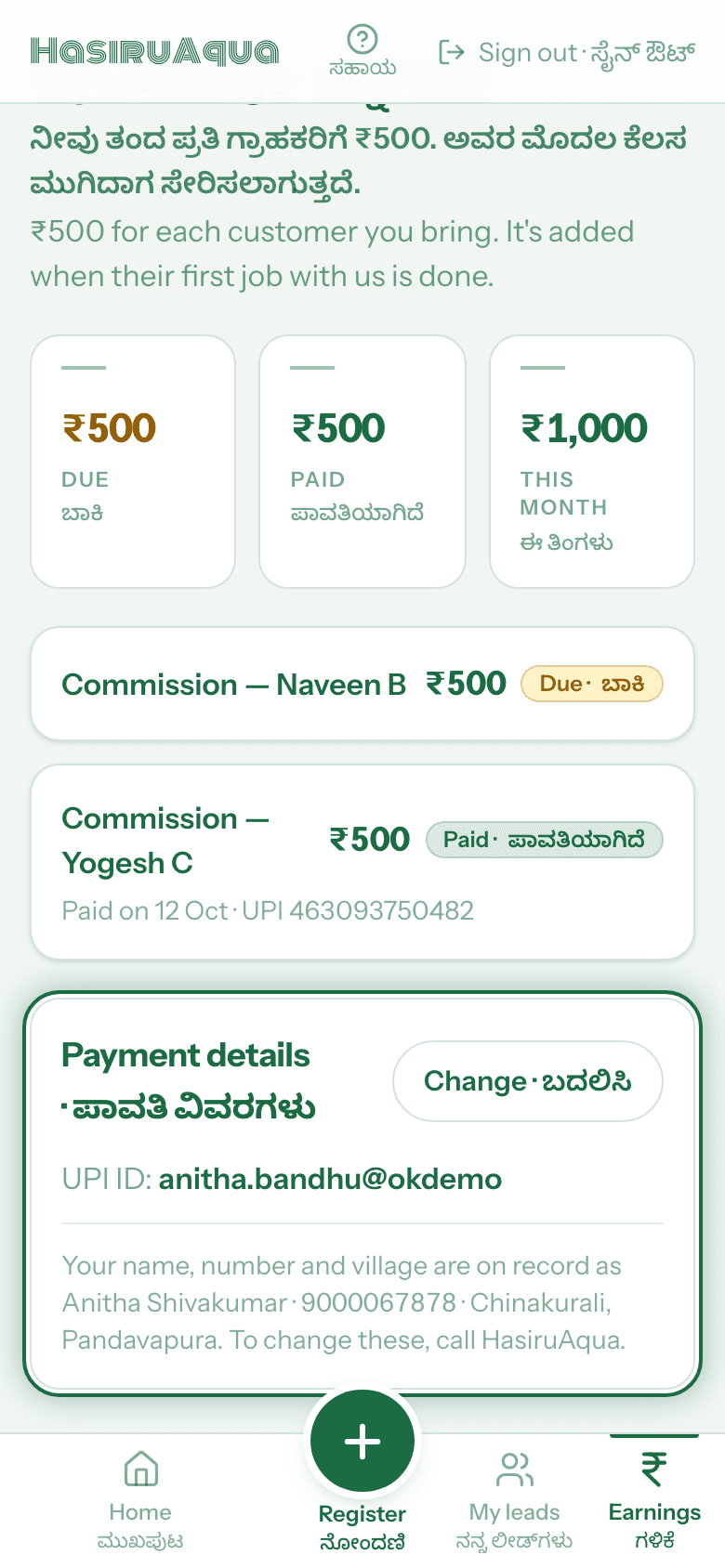
ಮೊದಲ ಬಾರಿ ನಿಮ್ಮ UPI ID ಸೇರಿಸಿ ಒತ್ತಿ. ನಂತರ ಬದಲಿಸಲು ಬದಲಿಸಿ ಒತ್ತಿ.
ನಿಮ್ಮ UPI ID ಬರೆಯಿರಿ, ಉದಾಹರಣೆಗೆ 98xxxxxx10@ybl ಅಥವಾ name@okaxis. UPI ID ಇದ್ದರೆ ಸಾಕು. ಬ್ಯಾಂಕ್ ಖಾತೆಗೆ ಹಣ ಬೇಕಿದ್ದರೆ ಬದಲಿಗೆ Account holder name (ಖಾತೆದಾರರ ಹೆಸರು), Account number (ಖಾತೆ ಸಂಖ್ಯೆ) ಮತ್ತು IFSC ತುಂಬಿ.
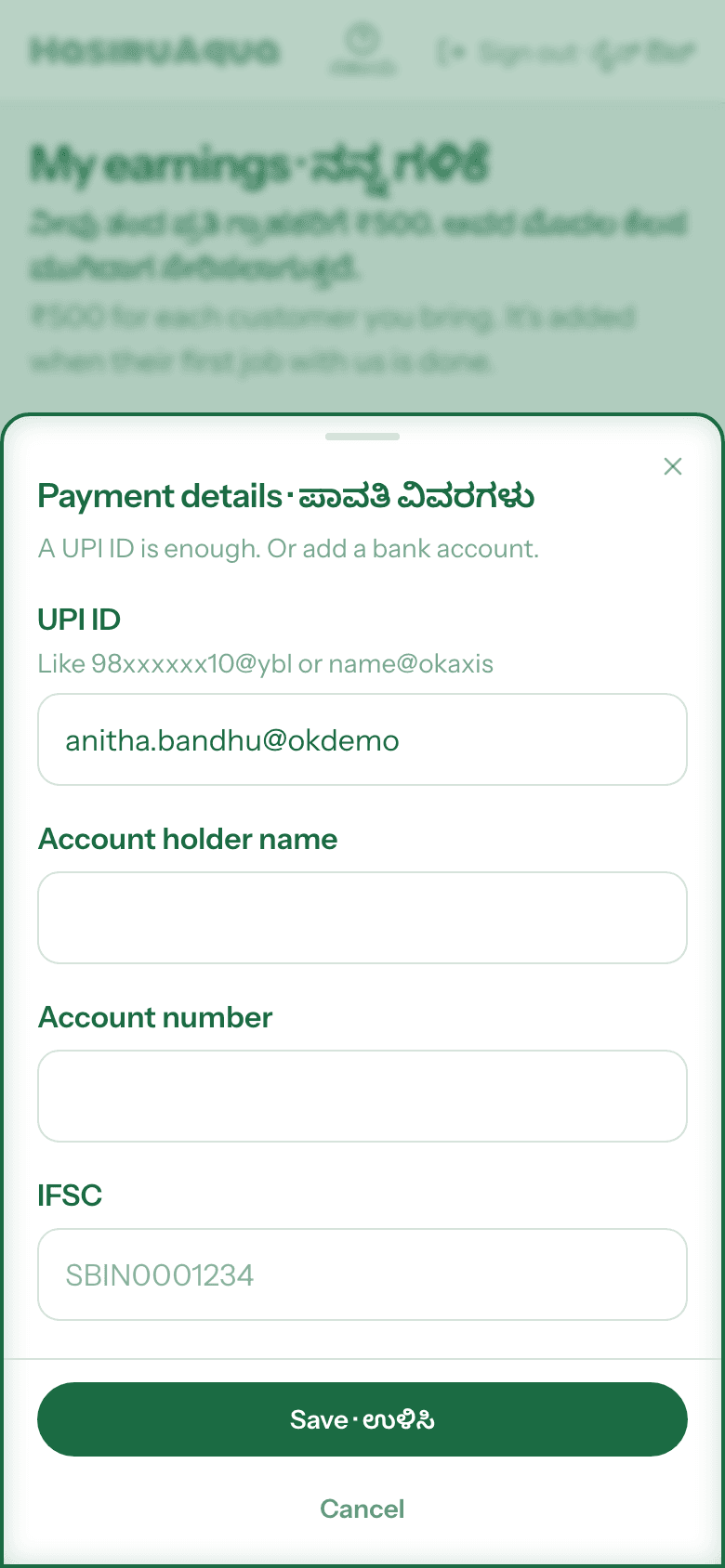
ಉಳಿಸಿ ಒತ್ತಿ. ಆ್ಯಪ್ Payment details saved ಎಂದು ಹೇಳುತ್ತದೆ. ಉಳಿಸದೆ ಹೊರಬರಲು Cancel ಒತ್ತಿ.
ನಿಮ್ಮ ಹೆಸರು, ಸಂಖ್ಯೆ ಮತ್ತು ಗ್ರಾಮ
ಪಾವತಿ ವಿವರಗಳ ಕೆಳಗೆ, ಹಸಿರುಆಕ್ವಾದವರ ಬಳಿ ಇರುವ ನಿಮ್ಮ ಹೆಸರು, ಮೊಬೈಲ್ ಸಂಖ್ಯೆ ಮತ್ತು ಗ್ರಾಮ ಕಾಣುತ್ತದೆ. ಇವನ್ನು ಆ್ಯಪ್ನಲ್ಲಿ ಬದಲಿಸಲು ಆಗುವುದಿಲ್ಲ. ಬದಲಿಸಲು ಹಸಿರುಆಕ್ವಾಗೆ ಕರೆ ಮಾಡಿ.
More for bandhus
- Signing in as a BandhuSign in with Google, using the Gmail address you gave HasiruAqua.
- Your Bandhu homeThe one big button to register a farmer, this month's numbers, and the bar at the bottom.
- Register a farmerAdd a farmer who wants to hear from HasiruAqua. Only the name, mobile number and what they want are needed.
- My leads, and what each status meansEvery farmer you've registered, newest first, and where each one is with HasiruAqua.
- Share what HasiruAqua offersSend farmers HasiruAqua's services on WhatsApp, each with a link to its page.
- My earningsHow you're paid, what's due, what's been paid, and what you've earned this month.
Was this the right page? Back to help home