My earnings
How you're paid, what's due, what's been paid, and what you've earned this month.
Tap Earnings · ಗಳಿಕೆ on the bar at the bottom.
The line at the top says how you're paid, in Kannada and English. For example: "₹500 for each customer you bring. It's added when their first job with us is done." If HasiruAqua pays you a monthly fee, it says how much, added at the end of each month.
The three numbers:
- Due · ಬಾಕಿ: earned, and not paid to you yet.
- Paid · ಪಾವತಿಯಾಗಿದೆ: already paid to you.
- This month · ಈ ತಿಂಗಳು: what you've earned this month.
Under them, each payment has its own line: Commission — … with the farmer's name, or Monthly fee — … with the month. Each line shows the amount and its status: Due · ಬಾಕಿ, Paid · ಪಾವತಿಯಾಗಿದೆ or Cancelled · ರದ್ದಾಗಿದೆ. A paid line says when it was paid and its payment reference.
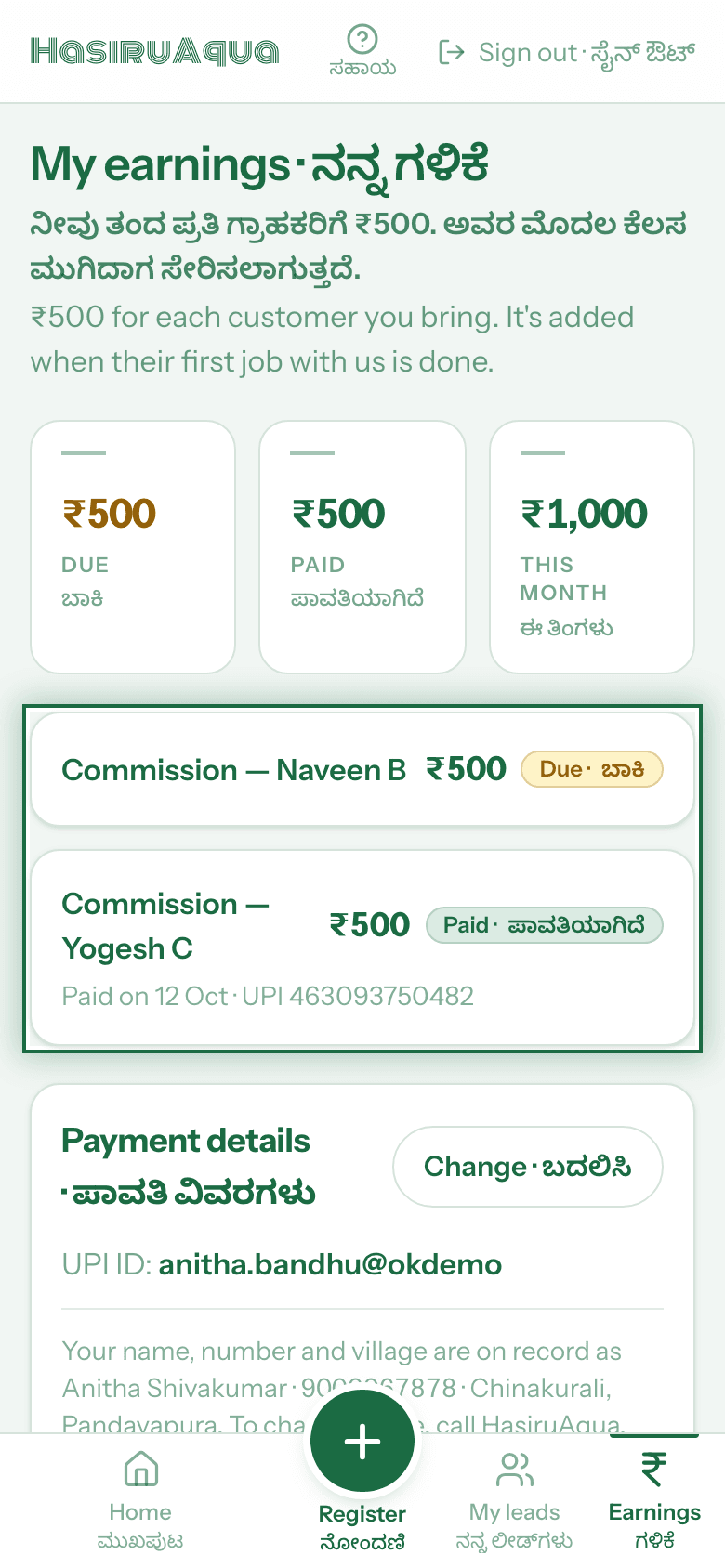
Payment details · ಪಾವತಿ ವಿವರಗಳು, at the bottom, is where HasiruAqua pays you. See Your payment details.
If something looks wrong
- There's no Earnings on the bar. HasiruAqua hasn't set your pay yet. Call them to ask.
- It says "No pay is set for you right now." Call HasiruAqua.
- A converted farmer isn't on the list. Commission is added when their first job with HasiruAqua is done, not when they say yes.
- A payment is missing or wrong. Call HasiruAqua with the payment reference.
More for bandhus
- Signing in as a BandhuSign in with Google, using the Gmail address you gave HasiruAqua.
- Your Bandhu homeThe one big button to register a farmer, this month's numbers, and the bar at the bottom.
- Register a farmerAdd a farmer who wants to hear from HasiruAqua. Only the name, mobile number and what they want are needed.
- My leads, and what each status meansEvery farmer you've registered, newest first, and where each one is with HasiruAqua.
- Share what HasiruAqua offersSend farmers HasiruAqua's services on WhatsApp, each with a link to its page.
- Your payment detailsAdd or change the UPI ID or bank account HasiruAqua pays you into.
Was this the right page? Back to help home