ಸೆನ್ಸರ್ ಕೆಲಸ ಮಾಡುತ್ತಿಲ್ಲವೇ? ಸೆನ್ಸರ್ ಸಹಾಯ ಬಳಸಿ
ಮೀನ್ಡಾಕ್ಟ್ರು ಸೆನ್ಸರ್ ಮೇಲೆ ಕೆಲವು ಸುಲಭ ಪರೀಕ್ಷೆಗಳು. ಆಗಲೂ ಸರಿಯಾಗದಿದ್ದರೆ ಹಸಿರುಆಕ್ವಾಗೆ ಮನವಿ.
ಇದು ಕರಡು ಅನುವಾದ, ಇನ್ನೂ ಪರಿಶೀಲನೆ ಆಗಿಲ್ಲ.
Draft translation, not yet checked. If something reads oddly, the English page is the one to go by.
ಸೆನ್ಸರ್ ಸಹಾಯ (ಪರದೆಯಲ್ಲಿ "Device help") ನಿಮ್ಮ ಸೆನ್ಸರ್ನ ಕೊನೆಯ ರೀಡಿಂಗ್ ನೋಡಿ ಏನು ತೊಂದರೆ ಇರಬಹುದು ಎಂದು ಹೇಳುತ್ತದೆ, ಮತ್ತು ಕೆಲವು ಸುಲಭ ಪರೀಕ್ಷೆಗಳನ್ನು ಒಂದೊಂದಾಗಿ ತೋರಿಸುತ್ತದೆ. ಅವುಗಳಿಂದ ಸರಿಯಾಗದಿದ್ದರೆ, ನೀವು ಏನೇನು ಮಾಡಿದ್ದೀರಿ ಎಂಬುದರ ಜೊತೆ ಹಸಿರುಆಕ್ವಾಗೆ ಮನವಿ ಕಳುಹಿಸುತ್ತದೆ.
My farm ಪುಟದಲ್ಲಿ ಹೊಂಡದ ಕಾರ್ಡ್ ಮೇಲಿನ Device not working? Get help → ಒತ್ತಿ. ಹೊಂಡದ ಪುಟದಲ್ಲೂ ಸೆನ್ಸರ್ ರೀಡಿಂಗ್ ಕೆಳಗೆ ಇದೇ ಲಿಂಕ್ ಇದೆ.
ಹೊಂಡದಲ್ಲಿ ಒಂದಕ್ಕಿಂತ ಹೆಚ್ಚು ಸೆನ್ಸರ್ ಇದ್ದರೆ ಆ್ಯಪ್ Which device isn't working? ಎಂದು ಕೇಳುತ್ತದೆ. ತೊಂದರೆ ಕೊಡುತ್ತಿರುವ ಸೆನ್ಸರ್ ಒತ್ತಿ.
ಮೇಲ್ಭಾಗದಲ್ಲಿ ಆ್ಯಪ್ ತೊಂದರೆ ಏನು ಇರಬಹುದು ಎಂದು ಹೇಳುತ್ತದೆ:
- Battery is low (ಬ್ಯಾಟರಿ ಕಡಿಮೆ)
- Device isn't sending readings (ಸೆನ್ಸರ್ ರೀಡಿಂಗ್ ಕಳುಹಿಸುತ್ತಿಲ್ಲ)
- No readings yet (ಇನ್ನೂ ಯಾವ ರೀಡಿಂಗ್ ಬಂದಿಲ್ಲ)
- Readings don't look right (ರೀಡಿಂಗ್ ಸರಿ ಕಾಣುತ್ತಿಲ್ಲ)
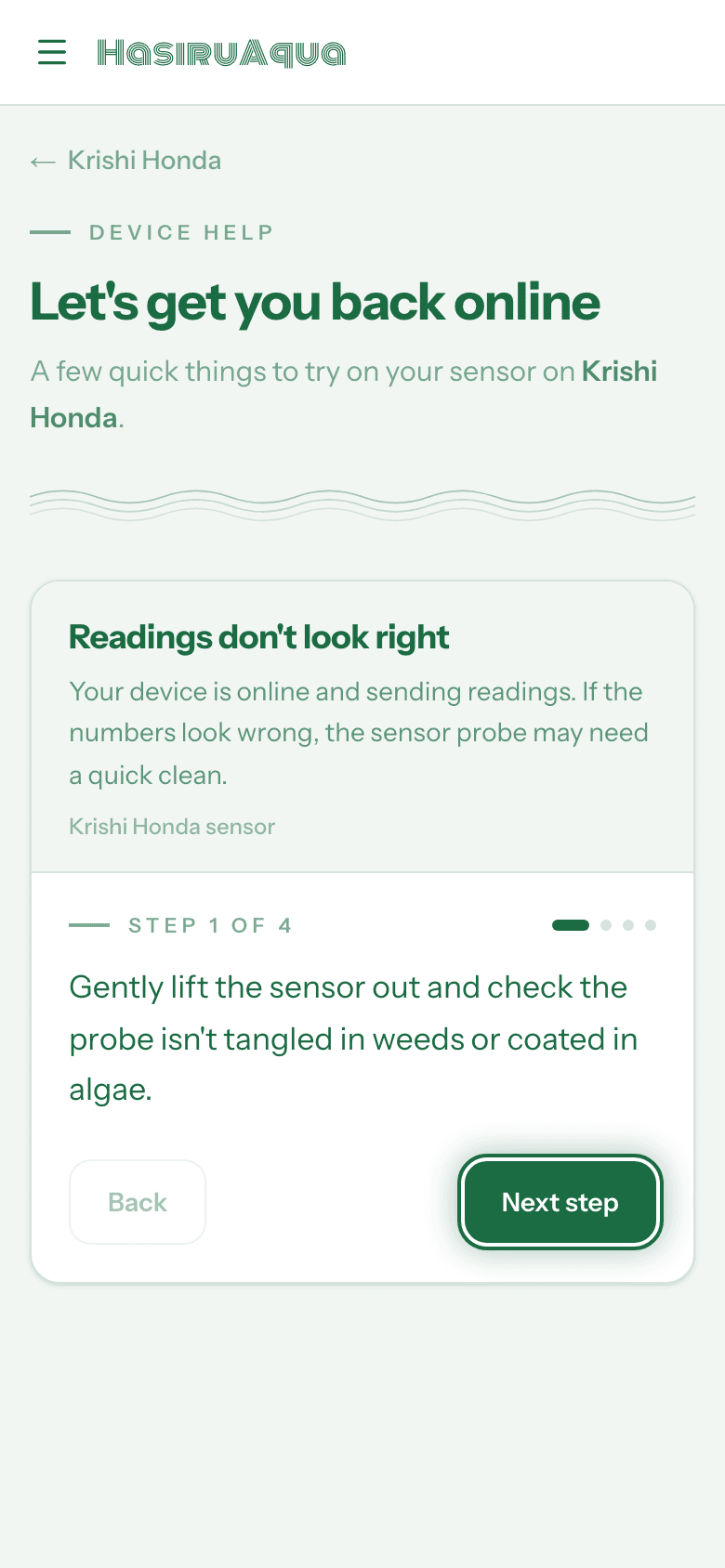
ಹಂತದಲ್ಲಿ ಹೇಳಿದ್ದನ್ನು ಮಾಡಿ, ನಂತರ Next step ಒತ್ತಿ. ಕೊನೆಯ ಹಂತದಲ್ಲಿ I've done these ಒತ್ತಿ.
ಆ್ಯಪ್ Is it working now? (ಈಗ ಕೆಲಸ ಮಾಡುತ್ತಿದೆಯೇ?) ಎಂದು ಕೇಳುತ್ತದೆ. ಎರಡು ನಿಮಿಷ ಕಾಯಿರಿ, ನಂತರ ಹೊಂಡದಲ್ಲಿ ಹೊಸ ರೀಡಿಂಗ್ ಬಂದಿದೆಯೇ ನೋಡಿ.
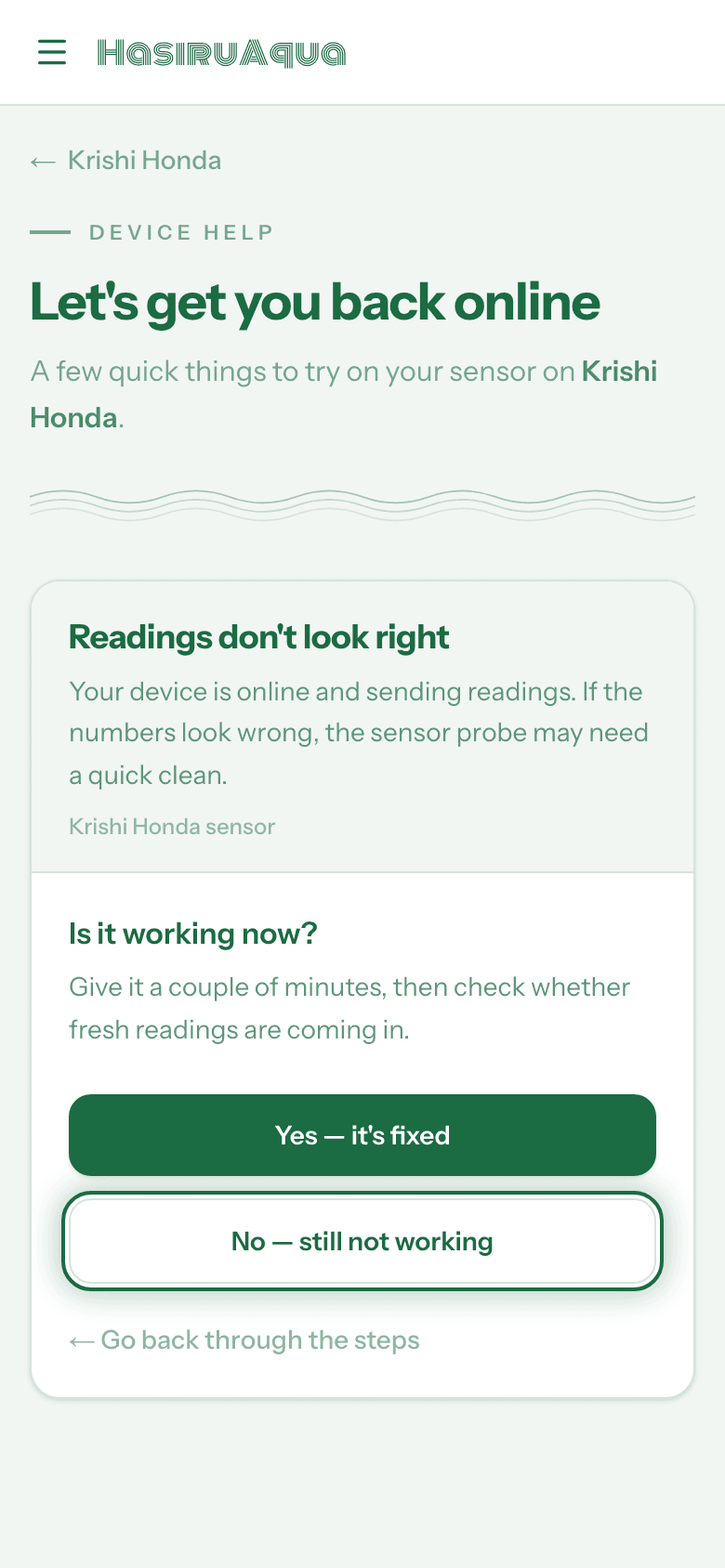
- ಸರಿಯಾಗಿದ್ದರೆ Yes — it's fixed ಒತ್ತಿ, ನಂತರ Back to pond.
- ಸರಿಯಾಗದಿದ್ದರೆ No — still not working ಒತ್ತಿ.
Anything else to add? (optional) ಬಾಕ್ಸ್ನಲ್ಲಿ ನೀವು ಗಮನಿಸಿದ್ದನ್ನು ಬರೆಯಿರಿ, ಉದಾಹರಣೆಗೆ "ಪ್ಯಾನೆಲ್ ಒಡೆದಿದೆ". ಬರೆಯದೆಯೂ ಕಳುಹಿಸಬಹುದು. ನಂತರ Send to HasiruAqua ಒತ್ತಿ.
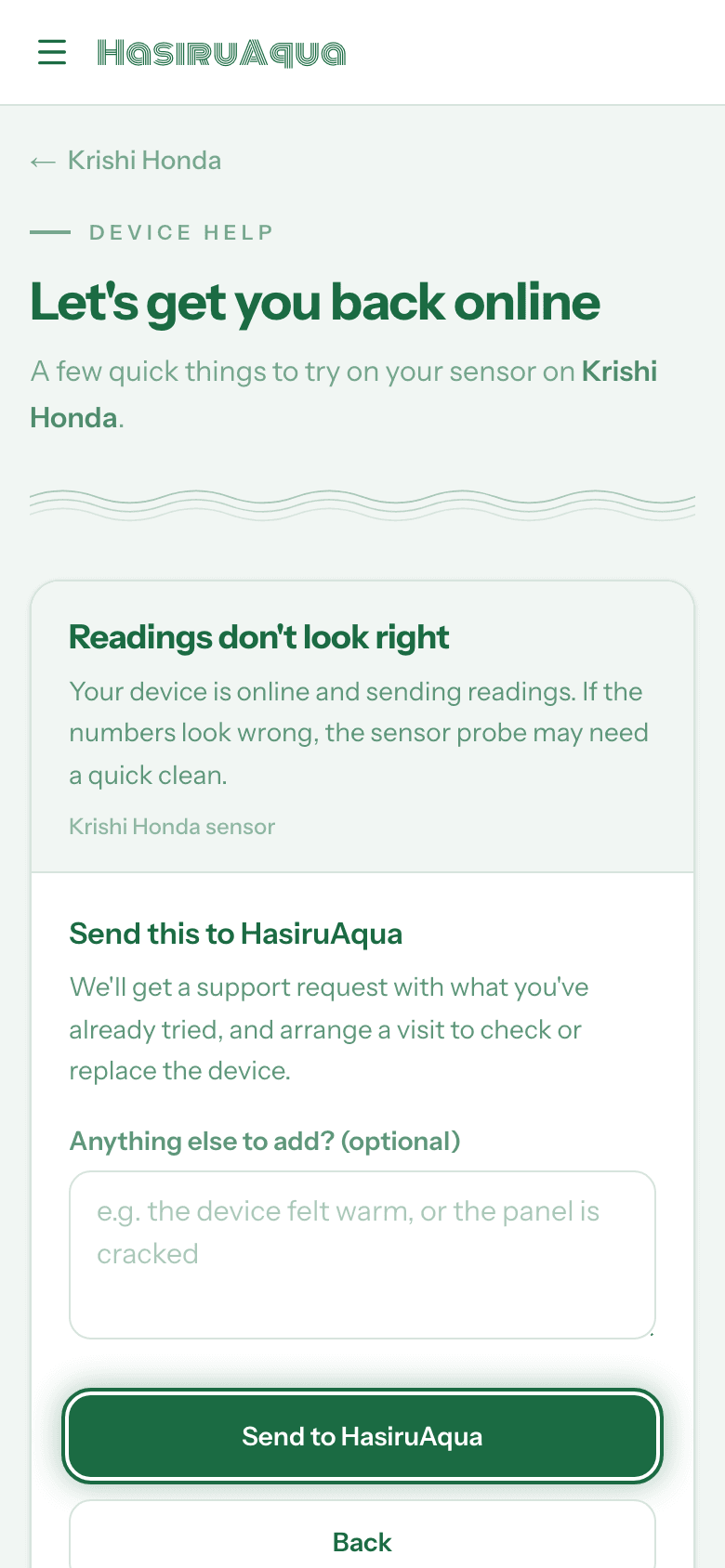
ಆ್ಯಪ್ Request sent — HasiruAqua has been notified. ಎಂದು ಹೇಳುತ್ತದೆ. ಹಸಿರುಆಕ್ವಾದವರು ಕರೆ ಮಾಡಿ ಬರುವ ದಿನ ತಿಳಿಸುತ್ತಾರೆ. ಮನವಿಯನ್ನು ನೋಡಲು View my requests ಒತ್ತಿ.
ಪರೀಕ್ಷೆಗಳು, ಚಿಕ್ಕದಾಗಿ
- Battery is low: ಸೋಲಾರ್ ಪ್ಯಾನೆಲ್ ಸ್ವಚ್ಛವಾಗಿ ಒರೆಸಿ, ನೇರ ಬಿಸಿಲಿಗೆ ಇಡಿ. ಚಾರ್ಜಿಂಗ್ ಕೇಬಲ್ ಇದ್ದರೆ ಹಾಕಿ. ಕೆಲವು ನಿಮಿಷ ಕಾಯಿರಿ.
- Device isn't sending readings ಅಥವಾ No readings yet: ಸೆನ್ಸರ್ ಆನ್ ಆಗಿದೆಯೇ, ಸೋಲಾರ್ ಪ್ಯಾನೆಲ್ ನೇರ ಬಿಸಿಲಿನಲ್ಲಿದೆಯೇ ಮತ್ತು ಧೂಳು ಇಲ್ಲವೇ, ಆಂಟೆನಾ ಗಟ್ಟಿಯಾಗಿ ಕೂತು ಮೇಲಕ್ಕೆ ನಿಂತಿದೆಯೇ ಎಂದು ನೋಡಿ. ಕೆಲವು ನಿಮಿಷ ಕಾಯಿರಿ.
- Readings don't look right: ಸೆನ್ಸರ್ ಅನ್ನು ನಿಧಾನವಾಗಿ ಮೇಲೆತ್ತಿ, ಅದರ ತುದಿಗೆ (ಪ್ರೋಬ್) ಕಳೆ ಅಥವಾ ಪಾಚಿ ಸುತ್ತಿದ್ದರೆ ತೆಗೆಯಿರಿ. ತುದಿಯನ್ನು ಶುದ್ಧ ನೀರಿನಲ್ಲಿ ತೊಳೆದು ಮೆತ್ತನೆಯ ಬಟ್ಟೆಯಿಂದ ಒರೆಸಿ. ಮತ್ತೆ ನೀರಿನೊಳಗೆ ಪೂರ್ತಿ ಮುಳುಗುವಂತೆ ಇಳಿಸಿ, ಆದರೆ ಹೊಂಡದ ತಳಕ್ಕೆ ತಾಗಬಾರದು. ಕೆಲವು ನಿಮಿಷ ಕಾಯಿರಿ.
ಕೆಲಸ ಮಾಡದಿದ್ದರೆ
- "Nothing to check here yet" ಎಂದು ಬಂದರೆ. ಆ ಹೊಂಡದಲ್ಲಿ ಸೆನ್ಸರ್ ಇಲ್ಲ. ಬದಲಿಗೆ Raise a request ಒತ್ತಿ.
- ಕಳುಹಿಸಲು ಆಗದಿದ್ದರೆ. ಫೋನ್ನಲ್ಲಿ ಇಂಟರ್ನೆಟ್ ಇದೆಯೇ ನೋಡಿ, ಮತ್ತೆ ಪ್ರಯತ್ನಿಸಿ. ಆಗಲೂ ಆಗದಿದ್ದರೆ ಹಸಿರುಆಕ್ವಾಗೆ ಕರೆ ಮಾಡಿ.
More for farmers
- Sign in to the HasiruAqua appSign in with Google, using the Gmail address you gave HasiruAqua.
- My farm, your ponds at a glanceEach pond, its latest reading, and your recent orders and requests, on one screen.
- A pond and its sensorOpen a pond to see its MeenDoctru readings, any alerts, and the fish in it.
- What an alert means, and what to doWhen a reading goes past HasiruAqua's limit, the app raises an alert. Here's what each one means.
- Ask HasiruAqua for helpSend HasiruAqua a request about a pond or your farm, and follow it until it's sorted.
- Your orders, and what each label meansFollow your seed and feed orders, pond build, MeenDoctru set-up and harvest sales from My farm.
Was this the right page? Back to help home